
What to Look for When Choosing Document Redaction Software
Your firm has decided it needs a dedicated redaction tool. Maybe the volume of disclosure work or consumer data requests has outgrown the manual-Acrobat approach. Maybe a near-miss with overlay redaction prompted a review. Whatever the trigger, you're now comparing products - and the feature lists blur together quickly. This guide cuts through the marketing to help you evaluate what actually matters.
By RedactProof Editorial Team · Feb 18, 2026 · Updated Sep 6, 2026 · 5 min read
Where your documents go during processing
This is the single most important question to ask any redaction vendor, and the one most easily obscured by marketing language.
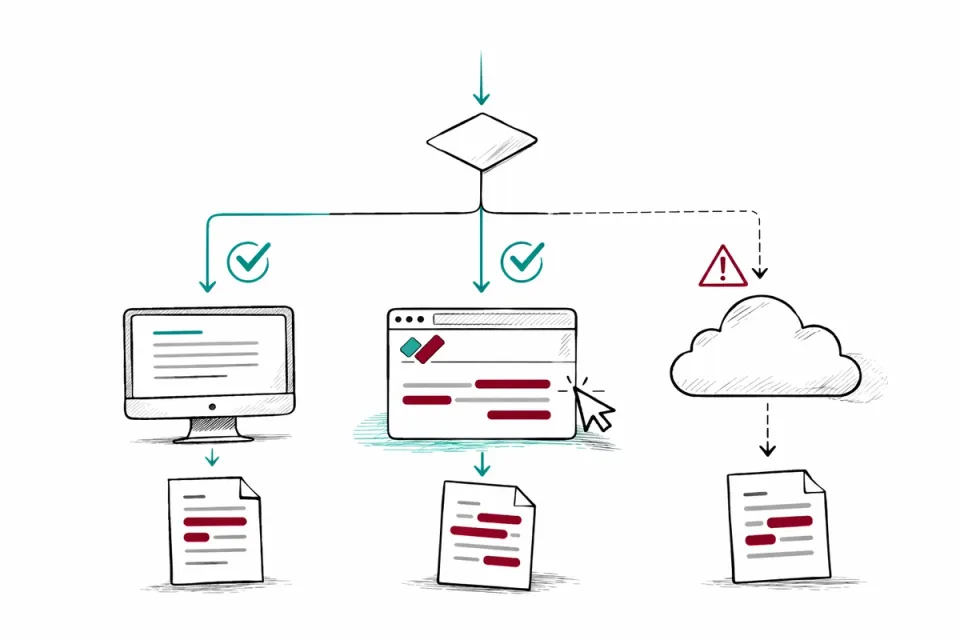
Three models exist. Local/client-side processing means the document stays on your device or in your browser. The software processes it using your hardware. Nothing is uploaded. Cloud processing means the document is uploaded to the vendor's servers, processed there, and returned. Hybrid means some processing happens locally and some happens remotely.
Why does this matter? If your organization handles confidential client data, legally privileged material, medical records, or financial information, sending those documents to a third party's servers creates a data processing relationship. Under HIPAA, that third party becomes a business associate and needs a Business Associate Agreement (BAA). Under CCPA and most state privacy laws, the third party is a service provider and needs a written services agreement with appropriate processing limits. Under attorney-client privilege rules, you may need explicit consent from the data owner.
Local processing avoids this entirely. The document doesn't leave your control, so there's no third-party processing relationship to manage.
RedactProof processes everything locally in your browser. Your documents and their text never leave your device, on every plan. There is no cloud mode, without uploading original documents.
Ask vendors directly: "Does our document file leave our device at any point during processing?" Anything other than a clear "no" means it does.
Detection method and accuracy
Manual-only tools (Adobe Acrobat, Foxit) rely entirely on you to find the sensitive data. You draw boxes, the tool removes the underlying content. Effective if you have the time and attention to review every page carefully. Risky if you don't.
AI-powered detection tools scan the document automatically and flag personal information by type - names, addresses, dates, identification numbers, financial data. Confidence scores help you prioritize review. The tool does the first pass; you review and confirm.
The gap between "has AI detection" and "has good AI detection" is significant. Questions to ask:
- How many PII types does it detect? (Fewer than 20 is limited. 40+ covers most real-world categories.)
- Can it detect PII in context, or only exact pattern matches? (Pattern matching catches "(312) 555-0142" as a phone number but misses "call me on three one two five five five...". Context-aware AI handles both.)
- How does it handle names in multiple formats? (Full name, surname only, initials, nicknames.)
- What's the false positive rate? (A tool that flags half the document wastes your time. A tool that misses genuine PII defeats the purpose.)
No detection tool catches everything. The right question isn't "does it miss anything?" (it will) but "does it reliably catch the standard PII categories and make my manual review faster?"
Redaction method
Every tool you evaluate should use pixel-burn redaction. Not overlay. If a vendor can't clearly confirm that their tool permanently removes underlying text data, disqualify it.
This seems obvious, but several products marketed as "redaction tools" actually produce overlay annotations. They look identical on screen but leave text recoverable. Test any tool by redacting a document with known content, then attempting to extract text from behind the redaction marks in a separate viewer.
Verification and audit trails
Verification certificates provide evidence that a document is exactly what was exported. Useful for litigation, regulatory submissions, and any situation where document integrity might be questioned.
Audit trails record who redacted what, when, and which PII types were identified and removed. Useful for internal compliance records and for responding to regulatory inquiries about your data handling processes.
Not every organization needs both immediately. A two-person title insurance shop probably doesn't need detailed audit trails on day one. A municipal records office processing hundreds of public records requests annually probably does.
Consider whether you need these features now, or whether you'll grow into them. Some tools include them in all plans. Others restrict them to enterprise tiers.
Pricing models
Redaction software pricing falls into three patterns.
Per-user licensing charges a monthly or annual fee per seat. Predictable costs but expensive for large teams. Adobe Acrobat, Foxit, and many desktop tools use this model.
Per-document or usage-based pricing charges based on volume. Cost scales with use. Good for variable workloads but harder to budget. Some cloud-based tools use this.
Tiered plans combine per-user pricing with feature gates at each level. RedactProof uses this model: a one-document free trial with full Pro features, Flex Packs (5 docs/$25 or 25 docs/$79) for occasional use, Core ($249/year individual annual licence, on-device AI detection, no certificates or audit trail), and Pro (per-seat $99 for 1-2 seats stepping down to $69 with volume across up to 100 seats, unlimited documents, certificates, audit trail, team features from 2 seats).
Factor in the cost of time, not just the license fee. A tool that costs $99/month but saves 20 hours of manual redaction work per month is cheaper than a tool that costs $15/month but requires everything to be done by hand.
Deployment and IT requirements
Desktop applications need installing on every machine. This means IT involvement, license management, and device-specific access. Fine for settled teams with consistent hardware. Difficult for organizations with BYOD policies, remote workers, or locked-down IT environments.
Browser-based tools need nothing installed. Open a browser, load the tool, start working. RedactProof runs in any modern browser on any device. This eliminates the IT procurement cycle and allows same-day adoption.
Cloud-based platforms sit somewhere between - no desktop install, but your documents travel to external infrastructure. Evaluate this against your data handling policies. To see these criteria applied, our roundup of 19 redaction tools scores each one against them.
DisclaimerThis guide is for informational purposes only and does not constitute legal, medical, or professional advice. Consult a qualified professional for advice specific to your situation.
Frequently Asked Questions
Should I choose a dedicated redaction tool or use our existing PDF software?
If your existing PDF software offers genuine pixel-burn redaction (not overlay) and your volume is low enough that manual detection is practical, it may be sufficient. The tipping point is usually volume and risk. Once you're processing more than a few documents per week, or handling documents where a missed PII item has real consequences (regulatory, legal, reputational), dedicated tools with automated detection pay for themselves quickly.
How do I evaluate redaction tools on a trial?
Prepare a test document containing known PII types - names in different formats, addresses, dates of birth, phone numbers, Social Security numbers, email addresses. Run the document through each tool you're evaluating. Compare what each tool detects versus what it misses. Then open the redacted output in a separate PDF viewer and try to recover text from behind the redactions. This tests both detection accuracy and redaction permanence.
Do cloud-based redaction tools comply with US privacy laws?
A cloud-based tool that processes your documents on its servers becomes a service provider under CCPA, a business associate under HIPAA, or both, depending on the data you handle. This is permissible, but you typically need a written agreement (a CCPA service-provider clause, a HIPAA Business Associate Agreement, or both) and the vendor must meet relevant security standards for the data type. You should also verify where their servers are located - cross-border processing may carry additional contractual obligations under sectoral or state laws. Local processing tools avoid this entirely.
Related Documentation
See it in action
Upload a document and let RedactProof find the sensitive data. Free to start, no card required.