
Overlay vs Pixel-Burn Redaction: One Protects Data, One Doesn't
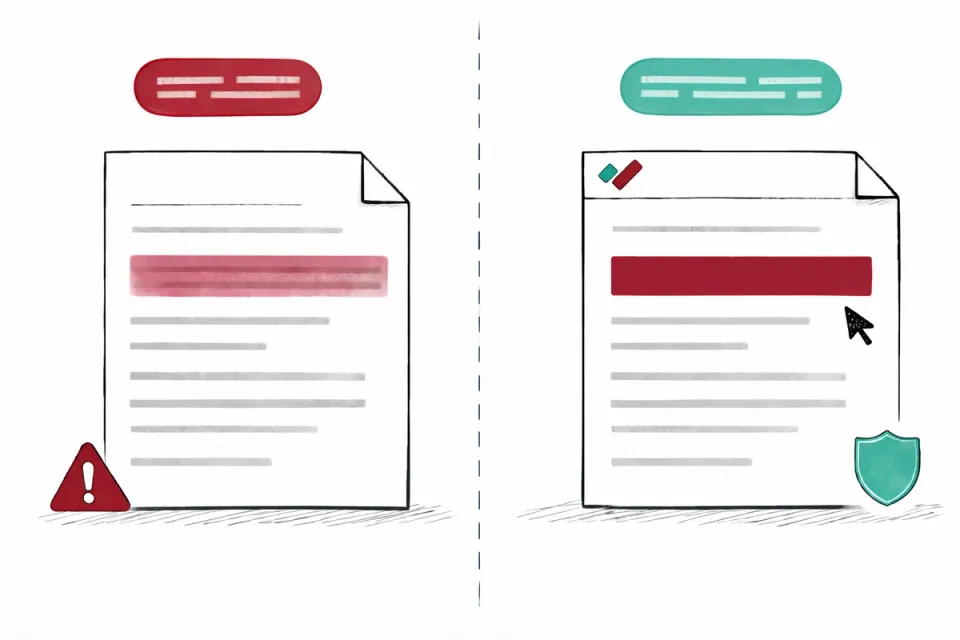
Two methods look identical on screen. A black bar covers sensitive text. But underneath, they're fundamentally different. Overlay redaction places a visual layer on top of text that remains in the file. Pixel-burn redaction replaces the text with image data, permanently destroying it. Which one your tool uses determines whether your redacted documents are actually safe to share.
By RedactProof Editorial Team · 18 Feb 2026 · Updated 6 Sept 2026 · 4 min read
How overlay redaction works
A PDF is a structured file. Text exists as data objects - character codes, font references, position coordinates. When you draw a black rectangle over text using an annotation tool, you're adding a new visual element to the page. The text data underneath hasn't changed. It's still there in the file structure, fully intact.
Anyone with a PDF editor (including free ones) can delete the annotation layer, revealing the text beneath. Even simpler: select all text on the page, copy it, paste into another application. The "redacted" content comes through.
Most general-purpose PDF tools use overlay by default. Adobe Reader's markup tools, Preview on Mac, browser PDF viewers, and virtually every free online PDF editor - these all create annotations, not redactions. They weren't designed for data removal. They were designed for reviewing documents.
How pixel-burn redaction works
Pixel-burn (sometimes called "flatten and burn" or "rasterise and redact") converts the relevant area of the page to an image, draws the redaction mark over it, and writes the result back. The original text data is replaced with pixels. There's nothing underneath to recover because the text object no longer exists in the file.
Think of it as the difference between putting tape over a line in a book versus cutting the line out and gluing blank paper over the gap. With tape, you can peel it off. With the cut, the original is gone.
The redacted area becomes part of the page image. If someone tries to select text in that region, they'll get nothing - or they'll get the OCR text layer if one exists, which contains only what's visible after redaction.
Why it matters for compliance
When an organisation discloses documents under data protection rules - responding to a SAR under GDPR, processing an FOI request, or sharing records as part of litigation disclosure - the personal data being redacted must actually be removed. If it's still present in the file, the disclosure is a data breach.
The ICO has investigated incidents where overlay redaction led to personal data exposure in public documents. Regulatory bodies including the ICO and FTC have published guidance recommending that organisations verify their redaction processes remove underlying data, not just cover it visually.
A small housing association sending a SAR response with overlay redaction faces the same regulatory scrutiny as a government department. The rules don't scale with organisational size.
The same principle extends beyond the burn itself. A scanned document's embedded text layer can lie about where words sit on the page, which sends coordinate-based redactions to the wrong spot. Pixels do not lie: RedactProof re-reads scanned pages with text recognition and realigns or replaces a text layer that disagrees with the print, so the boxes and the burn both operate on what is actually visible.
How to check which method your tool uses
The test takes thirty seconds.
Open a document in your redaction tool. Redact a line of known text - something specific you'll recognise. Save and close the file. Open the saved file in a different PDF viewer. Try to select and copy text from behind the redaction mark. If the text comes through, your tool uses overlay.
Run this test before you rely on any tool for external disclosure. Run it again after software updates, which can sometimes change default behaviour.
Redact with pixel-burn in your browser
RedactProof uses pixel-burn redaction by default - no configuration needed. Open a PDF, detect sensitive data with AI, and export with permanent, irreversible redactions and a tamper-evident verification certificate.
- Security architecture - documents are processed in your browser, never uploaded
- Compare plans - pixel-burn redaction included on every RedactProof plan, including the free trial.
- Verification certificates - prove your redacted exports have not been modified after export
Frequently Asked Questions
Can overlay redaction ever be reversed?
Yes. That's the core problem. Because overlay redaction adds a visual layer without modifying the underlying text data, removing or moving the annotation reveals the original content. Free PDF editing tools can do this in seconds. This is why overlay redaction should never be used when documents are shared externally.
Does pixel-burn redaction affect document quality?
There is a minor quality trade-off. Pixel-burn converts text to image pixels in the redacted areas, which can result in slightly lower visual sharpness compared to native text rendering. The unredacted portions of the document remain as normal text. In practice, the difference is negligible for standard document review. Some tools, including RedactProof, use OCR after pixel-burn to restore an invisible text layer, maintaining searchability while keeping the redacted content permanently removed.
What about redaction in Microsoft Word documents?
Word documents have their own data exposure risks. Track changes, comments, hidden text, and document properties can all contain personal data. Deleting visible text from a Word document doesn't guarantee removal from the file structure. The safest approach for disclosure is to redact the finalised PDF version using a dedicated redaction tool, rather than attempting to redact the Word source. If you must work in Word, run Microsoft's Document Inspector before sharing.
Related Documentation
Try it yourself
Put this into practice with RedactProof. Free account, no installation needed.