
Redaction verification certificates
If someone questions whether a redacted document has been modified after export, you need tamper evidence. RedactProof generates Ed25519 digital signatures and SHA-256 hashes for every export, giving recipients a way to independently check document integrity.
By RedactProof Editorial Team · 30 Mar 2026 · Updated 6 Sept 2026 · 6 min read
This article is for general informational purposes only and does not constitute legal advice. Regulatory requirements vary by jurisdiction and change over time. Consult a qualified legal professional for advice specific to your organisation's circumstances.
A solicitor sends a redacted employment tribunal bundle to opposing counsel. Two weeks later, the other side claims the documents were altered after redaction - that pages were swapped, that redaction boxes were repositioned, that the version they received is not the version that left the solicitor's desk. Without a way to settle the question, both parties spend billable hours arguing about document integrity instead of the case itself.
Verification certificates exist to prevent that argument from happening in the first place.
What a verification certificate is
When you export a redacted PDF from RedactProof, the application generates a SHA-256 cryptographic hash of the finished file. Think of it as a fingerprint - unique to that exact arrangement of bytes. Change a single pixel, shift one redaction box, alter any metadata, and the fingerprint changes completely.
The certificate also includes an Ed25519 digital signature created with RedactProof's private key. Together, the hash and signature allow anyone to confirm two things: that the document is exactly what was exported, and that it was genuinely produced by RedactProof.
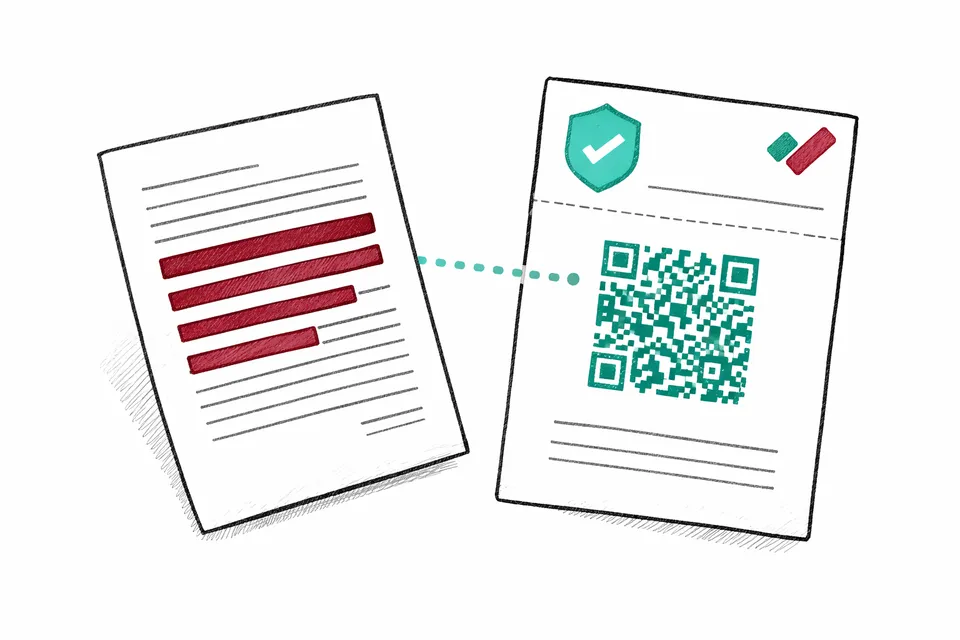
Certificates are attached as the first or last page of the exported PDF and include a scannable QR code for quick verification. One page. No separate files to track.
How verification works
Recipients can verify a redacted document in three ways. None of them require a RedactProof account, and all produce an instant result.
- QR code scan - The fastest option. Point a phone camera at the QR code on the certificate page. It opens the verification portal with the certificate details pre-loaded.
- File upload - Drop the redacted PDF into the verification portal. RedactProof recalculates the SHA-256 hash and checks it against the stored certificate. If even one byte differs, verification fails.
- Certificate ID lookup - Every certificate carries a unique ID (e.g. RP-CERT-abc123). Enter it directly into the portal to pull up the certificate record without uploading the file.
What a valid certificate indicates
A successful verification tells the recipient five things:
- The document is exactly what was exported - not a single byte has changed
- The redaction was performed using RedactProof
- When the redacted file was exported (timestamp)
- How many entities were redacted across the document
- Who certified the document (email or reference ID)
That last point matters more than it sounds. If a data protection officer redacts an SAR response on Tuesday and the requester raises a complaint on Friday, the certificate ties the specific output to a specific person at a specific time. No ambiguity.
What certificates do not cover
Verification certificates confirm integrity, not completeness. This is an important distinction worth being direct about.
A certificate does not confirm that every piece of sensitive information was found and redacted. It does not confirm that the correct redaction categories were applied - perhaps you redacted names but missed email addresses. And it says nothing about whether the original document was authentic in the first place.
What the certificate does provide is tamper evidence for the redacted output. If someone modifies the file after export - whether deliberately or through file corruption - verification will detect it. The quality of redaction itself depends on the detection settings and the review process your team follows before hitting export.
Recipient instructions
If you are sharing redacted documents with third parties - opposing counsel, a regulator, a data subject who submitted an SAR - you can include these verification instructions alongside the files:
- Open the redacted PDF and find the certificate page (first or last page)
- Scan the QR code with your phone camera, or visit redactproof.com/verify
- Upload the PDF file or enter the certificate ID shown on the certificate page
- The portal will confirm whether the document is authentic and unmodified
No account or software installation is required. If you are a sole practitioner sending redacted files to the ICO, you might paste these steps into the cover email. Larger firms may prefer to include them as standard text in their disclosure cover letters.
How certificates support compliance
Consider a council responding to a Freedom of Information request. They redact third-party personal data from internal emails, export the bundle, and send it to the requester. Three months later, the requester appeals to the Information Commissioner's Office, claiming the council altered the documents after the initial response.
With a verification certificate, the council can demonstrate in seconds that the file the requester holds is byte-identical to the file that was originally exported. Dispute resolved.
This kind of tamper evidence is relevant across several common scenarios:
- Subject access requests - When a data subject receives their SAR response and questions whether information was removed after the fact, the certificate settles it. See our SAR redaction guide for the full workflow.
- Legal disclosure - Employment tribunal bundles, personal injury claim files, family court welfare reports. Any document exchanged between legal teams where the integrity of redactions might later be challenged.
- Regulatory submissions - Submitting redacted records to the FCA, ICO, CQC, or Ofsted? Including a certificate alongside the documents demonstrates chain of custody without requiring additional paperwork.
- Internal audit - Maintain a verifiable record of when documents were redacted and by whom. Useful for ISO 27001 evidence, annual DPA reviews, or simply having a paper trail your compliance team can point to during audits.
Technical details
For those who want the specifics:
- Hash algorithm: SHA-256 applied to the complete redacted PDF file
- Signature algorithm: Ed25519 (Curve25519) digital signatures
- Certificate storage: Hash and metadata stored server-side; original document content is never uploaded
- Retention: Certificates are retained until account deletion
- Verification: Free, instant, no account required
The privacy angle is worth emphasising. Only the hash - a 64-character string - leaves your browser when a certificate is created. The document itself stays on your device. Nobody at RedactProof can read your files, because we never receive them.
For more on how this works at an architectural level, see our security page. For export options and certificate placement, see the exports documentation.
Plans that include certificates
Verification certificates are included on Pro (individual and team seats). Core and the free trial do not include them. See our plan comparison for a full feature breakdown.
Frequently Asked Questions
Do recipients need a RedactProof account to verify a certificate?
No. Verification is free, instant, and does not require a RedactProof account. Recipients can scan the QR code, upload the PDF, or enter the certificate ID in the verification portal.
What happens if the document is modified after export?
Any change to the exported PDF, even a single byte, will change its SHA-256 hash. When the modified file is uploaded, the verification portal will detect the mismatch and mark the certificate as invalid.
Does a valid certificate mean all sensitive data was correctly redacted?
No. A valid certificate provides evidence of integrity and authenticity of the redacted output, not the completeness or correctness of the redaction. Effective redaction still depends on your detection settings and human review before export.
Which plans include verification certificates?
Verification certificates are included on Pro (individual and team seats). Core and the free trial do not include certificates.
Try it yourself
Put this into practice with RedactProof. Free account, no installation needed.